This method only works on:
onestore/qoo-app/googleplay/bluestack/Steam verison of HorizonWalker (Global server)
>>First
Download this “lastlogindata.es” file in Mega drive
https://mega.nz/file/1GkW2bba#A8kdaraN0aVlEmTttnC17_AJhyDM6QkblBnE5IwNi6w
>>Then
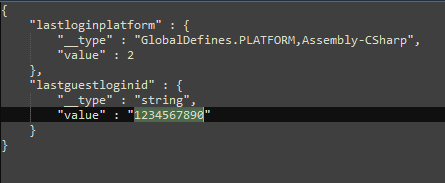
Edit using a notepad/any text editor
Replace 1234567890 with the code I gave
>>Then,
On emulator
Android/data/com.gentlemaniac.horizonwalker/files
folder

or
PC (for Steam HW)
C:\Users(your pc user)\AppData\LocalLow\GentleManiac\HorizonWalker
In these folders
Delete any old “lastlogindatas.es” or “lastlogindata.es”
and put new file inside
then start game, if all correct, you’ll get auto logged in.
then can go to settings – account to link gmail etc
(Steam version can link gmail/Steam/Apple)
(Android verison can only link gmail)
Leave a Reply
You must be logged in to post a comment.